Manav Sampada Leave is an online facility provided by the Uttar Pradesh government through the Manav Sampada Portal (ehrms.upsdc.gov.in) that allows state government employees to apply for leave, track leave status, and view their leave balance digitally. This system has replaced manual paperwork, making leave management transparent, fast, and error-free.
In this detailed guide, you’ll learn how to apply for leave on Manav Sampada, types of leave available, rules, approval process, and common problems with solutions.
What Is Manav Sampada Leave System?
The Manav Sampada Leave Management System is part of the UP Government’s eHRMS (Electronic Human Resource Management System). It enables employees such as teachers, clerks, health workers, and other government staff to:
- Apply for leave online
- Check leave approval status
- View available leave balance
- Maintain a digital leave record
This portal is mandatory for most UP government departments.
Benefits of Manav Sampada Leave Portal
Using the Manav Sampada portal for leave management offers several advantages:
- No need for offline leave applications
- Faster approval from department authorities
- Real-time leave status tracking
- Accurate leave balance calculation
- Transparent and paperless process
- Accessible anytime, anywhere
Types of Leave Available on Manav Sampada
The Manav Sampada portal supports multiple types of leave as per UP government service rules.
Common Leave Types
- Casual Leave (CL)
- Earned Leave (EL)
- Medical Leave (ML)
- Child Care Leave (CCL)
- Maternity Leave
- Paternity Leave
- Study Leave
- Special Leave
Availability may vary depending on department and employee category.
How to Apply for Leave on Manav Sampada Portal? (Step-by-Step)
Follow these steps to apply for leave online:
Step 1: Visit the Official Website
Go to the official Manav Sampada portal:
ehrms.upsdc.gov.in

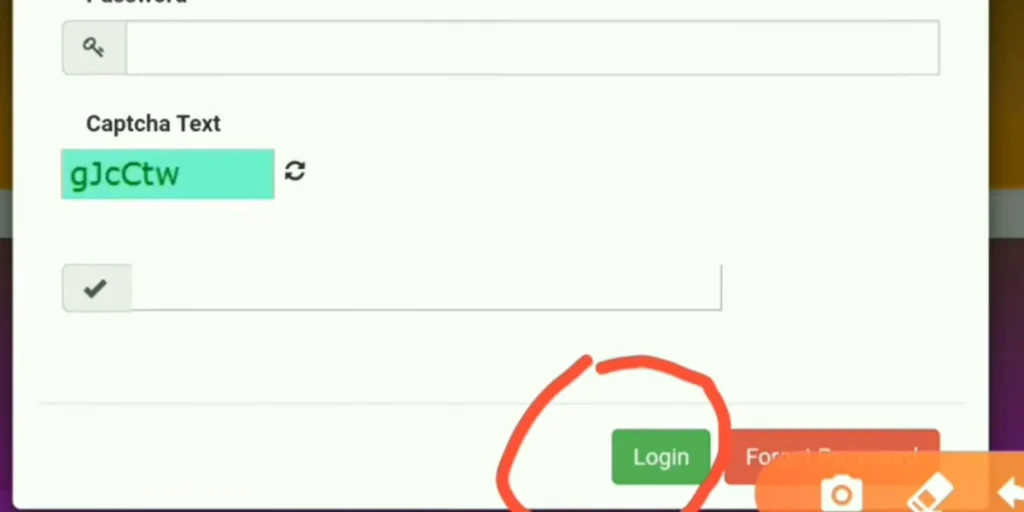
Step 2: Login to Manav Sampada
Enter the following details on the login page:
- Employee ID / User ID
- Password
- Captcha Code
Click on Login to open your dashboard.
Step 3: Open Leave Application Option
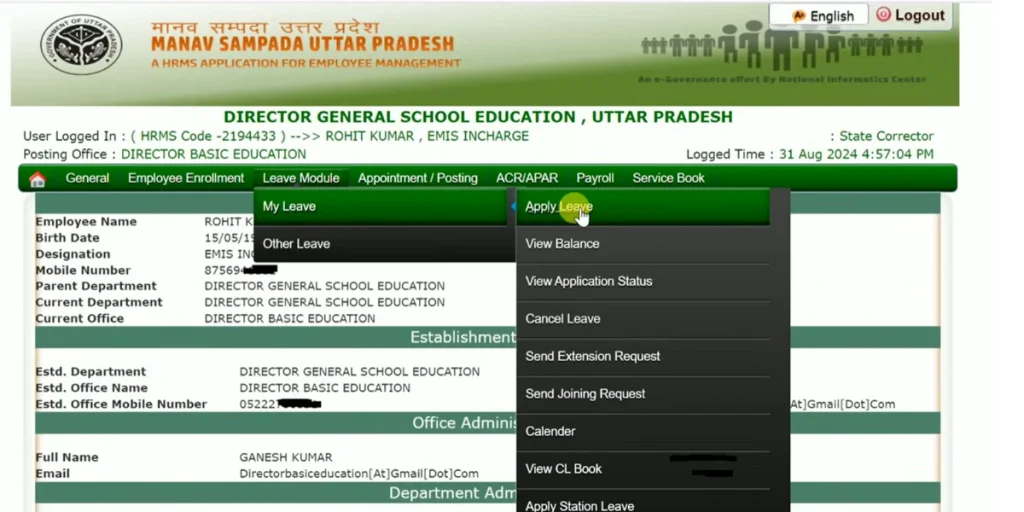
After login:
- Click on the Leave tab
- Select Apply Leave from the menu
Step 4: Choose Leave Type
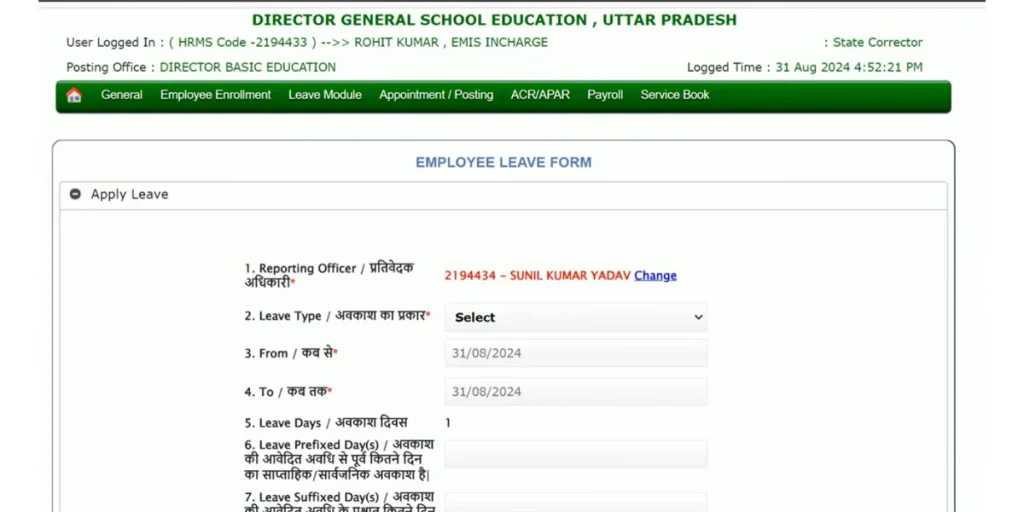
Select the required leave type such as:
- Casual Leave (CL)
- Earned Leave (EL)
- Medical Leave (ML)
- Child Care Leave (CCL)
- Maternity / Paternity Leave
(Available leave types depend on department rules.)
Step 5: Select Leave Dates
Enter:
- Leave start date
- Leave end date
The system will automatically calculate total leave days.
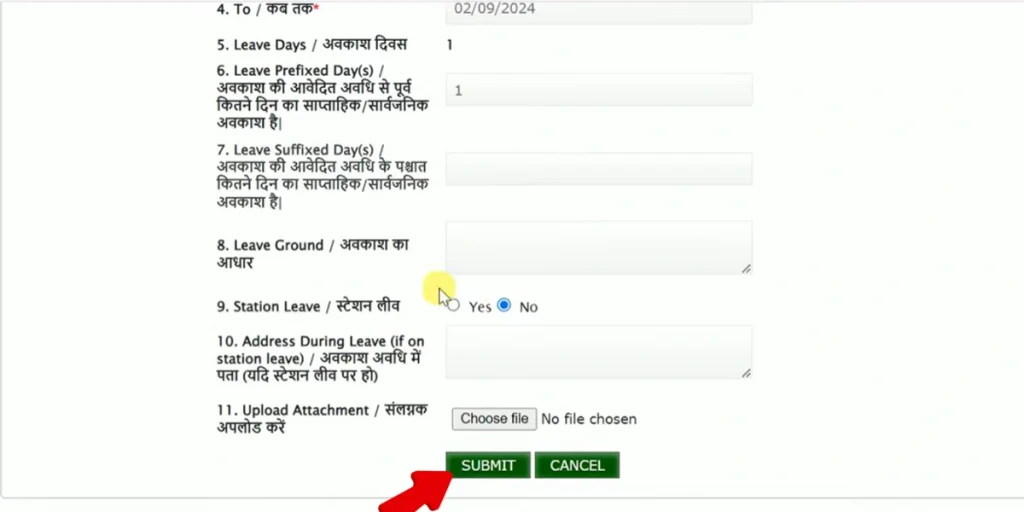
Step 6: Enter Reason & Upload Documents
- Write the reason for leave
- Upload supporting documents if required (medical certificate, approval letter, etc.)
Step 7: Submit Leave Application
Check all details carefully and click on Submit.
Your leave request will be forwarded to the Reporting Officer / Approving Authority.
Step 8: Track Leave Status
To check the status:
- Go to Leave → Leave Status
- View approval status as Pending / Approved / Rejected
How to Check Manav Sampada Leave Status?
To check your leave approval status:
- Log in to the Manav Sampada portal
- Go to Leave → Leave Status
- Select the relevant leave period
- View status: Pending / Approved / Rejected
How to Check Leave Balance on Manav Sampada?
Employees can check their remaining leave balance easily:
- Login to Manav Sampada
- Click on Leave → Leave Balance
- View year-wise available and used leave
This helps in planning future leave properly.
Manav Sampada Leave Approval Process
Once the leave is applied:
- The application goes to the Reporting Officer
- Officer reviews details and documents
- Leave is Approved or Rejected
- Employee gets a status update on the portal
Approval time depends on department workflow.
Important Rules for Manav Sampada Leave
- Leave approval is subject to departmental rules
- Backdated leave may require special permission
- Medical leave requires valid proof
- Excess leave without approval may affect salary
- Incorrect entries can lead to rejection
Always double-check details before submission.
Common Problems & Solutions in Manav Sampada Leave
Problem: Login Not Working
Solution: Reset password or contact the department nodal officer
Problem: Leave Balance Showing Incorrect
Solution: Report to DDO or HR section
Problem: Leave Application Rejected
Solution: Check reason, correct details, and reapply
Problem: Leave Pending for a Long Time
Solution: Contact the approving authority directly
Who Can Use the Manav Sampada Leave System?
The portal is used by:
- UP Government Teachers
- Education Department Staff
- Health Department Employees
- Secretariat & District Office Staff
- Other State Government Employees
Private employees are not eligible.
Is Manav Sampada Leave Mandatory?
Yes. For most UP government departments, Manav Sampada is the official and mandatory system for leave management. Offline leave applications are generally not accepted.
Frequently Asked Questions (FAQs)
Yes, you can cancel leave before approval from the leave section.
Yes, Manav Sampada is accessible on mobile browsers.
You should contact your reporting officer or DDO.
No, medical proof is mandatory.